Old usernames create one of the easiest OSINT pivot points because Google continues to index pages long after you abandon them. This guide shows how to identify every leak, delete the source, wipe cached artifacts, and force Google to update its results. If you’re securing a new identity or cleaning up a compartment, removing old handles is critical to shutting down unwanted correlations and tightening your operational footprint.
You built a new identity. A clean slate. Tight compartments. Better OPSEC. But Google still digs up who you were five years ago. Old usernames are still indexed. Dead accounts still surface. Cached pages still show handles you abandoned. And every time you search your name or your old alias you see the same breadcrumb trail staring back.
It’s embarrassing. It’s a footprint leak. It’s one of the easiest attack surfaces for anyone profiling you. Here’s how you wipe it.
What Happens When Google Keeps Old Usernames
Google doesn’t care that you moved on. Their index is a snapshot of the past. If your username ever touched a public page, that snapshot proabably still lives somewhere. The internet never forgets.
This creates three issues:
- It links your past behavior to your current identity
- It gives OSINT scrapers an easy pivot point
- It weakens the compartment you’re trying to build right now
If your old handle points to you, you lose the one thing that matters in privacy work: narrative control.
Step 1: Identify the Username Trail
Do some reconnaissance on yourself. Run these searches:
- “oldusername”
- “oldusername” site:reddit.com
- “oldusername” site:twitter.com
- “oldusername” site:x.com
- “oldusername” site:instagram.com”
- “oldusername” site:github.com”
- “oldusername” site:medium.com”
- “oldusername” site:tumblr.com”
- “oldusername” site:pinterest.com”
- “oldusername” site:linkedin.com”
- “oldusername” “profile”
- “oldusername” “feet pics” (I don’t judge)
Check the specific sites you had accounts with or might have gotten cross referenced by and then check Google Images. The goal is to map every public page that still displays your legacy identity.
Step 2: Delete the Source if You Still Control It
If the account is yours:
- Change the username to something disposable
- Delete posts
- Scrub the profile
- Disable indexing if the platform supports it
- Deactivate or delete the entire account
This forces Google to update the reference point even before you submit removals. Never reuse the same username across compartments. That’s how the whole chain collapses.
Step 3: Request Removal Using Google’s Hidden Tools
Don’t just stop at deleting the account. Your username will still linger for months or years. You need to hit Google directly.
- You will need a google account (create and use a burner if needed)
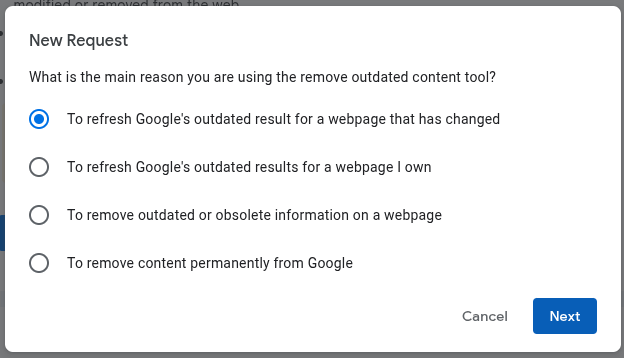
Use Google’s Remove Outdated Content tool
Submit every outdated link where:
- you deleted the page
- you changed the username
- the platform no longer shows the old handle
- the cached version is outdated
- the snippet still leaks old info
This tool is your fast lane. Results usually update within hours to days. Use Google’s obsessive need to have up to date information about everyone against them.
Use Google’s Search Console
You don’t need to own the site. You can still request:
- outdated snippet removal
- outdated cache removal
This is how you wipe the “preview text” that keeps exposing you even after the page is gone.
Step 4: Request Removal From the Platform Itself
Google isn’t the only problem. Many OSINT friendly platforms keep public mirrors.
You need to hit:
- namelookup platforms
- social archive sites
- link aggregator clones
- shady SEO sites scraping old profiles
- third party crawlers
Look for:
- “delete profile”
- “opt out”
- “privacy request”
- “remove listing”
These sites depend on being lazy. You pushing one request often clears multiple mirrors.
Step 5: Clean Up the Cached Artifacts
Even after everything is removed, Google might still show:
- screenshots
- thumbnails
- image previews
- cached HTML
- old bio text in snippets
To kill these, use Google’s image removal request on Google’s Remove Outdated Content tool that we used earlier.
- Google’s Remove Outdated Content tool -> New Request -> To refresh Google’s outdated result for a webpage that has changed -> Next ->Select the Image tab
Submit:
- any image containing the old username
- screenshots of accounts you closed
- profile picture derivatives
- thumbnails the platform no longer hosts
This part takes time. Do it anyway. It closes the loop.
Step 6: Build a Wall Around Your New Identity
You aren’t just deleting an old username. You’re securing the narrative around your current one.
Lock in:
- consistent naming compartments
- no cross contamination between handles
- no reused bios
- no reused emails
- no reused recovery numbers
- no reused avatar images
Your future footprint should not rhyme with your past footprint. That’s the point of the reset.
Step 7: Flood Google With the Identity You Want Indexed
Google can’t delete a vacuum. It fills gaps with whatever it can find. So you replace the old with the new.
Publish:
- your new username
- your new author pages
- your new platforms
- your new profiles
- your controlled content
You outrank your ghosts by burying them with your present.
Final Thought
Old usernames hold on longer than you think. They survive deactivated profiles, deleted content, and forgotten platforms. And if you leave them untouched, someone else will use them to map you.
Don’t let your past trail define your present threat surface. Delete it. Overwrite it. Replace it with something intentional.
Claw back the narrative. You’re the one steering this now.
GHOST
Untraceable Digital Dissident